Jameica: Plugin-Fehler

Fehlermeldung: Table file for 000SYS_INFO_sUSRSequenceInfo was not found

HeinzBoettjer

Betreff:

Jameica: Plugin-Fehler

 ·  Gepostet: 14.02.2015 - 20:31 Uhr  ·  #114829
Seit heute kommt beim Start des Programmes der folgende Fehler:
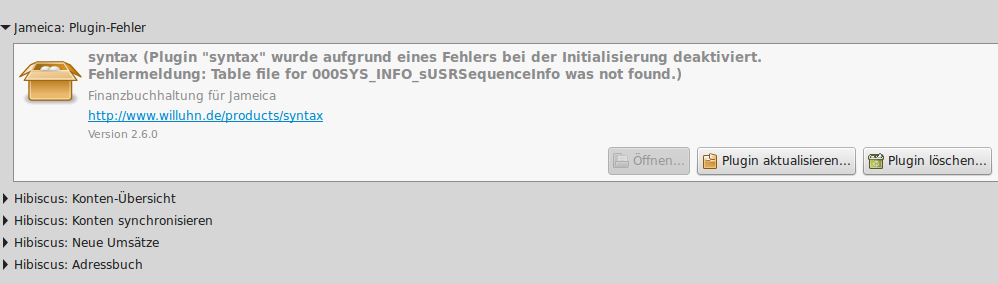
Ich kann mich nicht entsinnen das bei der letzten Nutzung vor zwei Tagen etwas besonderes vorgefallen ist.

Nachtrag 15.01. 14:11
Die syntax.zip noch einmal herunter zu laden und zum aktualisieren zu nehmen hat das Problem leider nicht gelöst.

hibiscus

Betreff:

Re: Jameica: Plugin-Fehler

 ·  Gepostet: 16.02.2015 - 10:43 Uhr  ·  #114859
Das Problem ist nicht das Plugin sondern scheinbar eine korrupte SynTAX-Datenbank. Kam es zu irgendwelchen Schreibfehlern auf dem Datentraeger? Hast du den Benutzer-Ordner vielleicht auf einem USB-Stick oder einem Netzlaufwerk?

HeinzBoettjer

Betreff:

Re: Jameica: Plugin-Fehler

 ·  Gepostet: 16.02.2015 - 12:10 Uhr  ·  #114864
Netzwerklaufwerk kommt der Sache am nächsten.
Das Verzeichnis liegt im Dropbox-Ordner.
Aber auf meinen Laptop habe ich jameica dieses Jahr noch nicht genutzt.

hibiscus

Betreff:

Re: Jameica: Plugin-Fehler

 ·  Gepostet: 16.02.2015 - 12:11 Uhr  ·  #114865
Uuh! Dropbox! Nimm das dringend da runter und suche einen anderen Weg der Synchronisierung. Ich gehe davon aus, dass der Dropbox-Client die SynTAX-Datenbank "zersägt" hat.

HeinzBoettjer

Betreff:

Re: Jameica: Plugin-Fehler

 ·  Gepostet: 16.02.2015 - 12:16 Uhr  ·  #114866
Aversion gegen Dropbox oder einer Cloud-Lösung allgemein?
Die nächste Möglichkeit wäre für mich dann bittorrent sync.

hibiscus

Betreff:

Re: Jameica: Plugin-Fehler

 ·  Gepostet: 16.02.2015 - 12:21 Uhr  ·  #114867
Zitat geschrieben von HeinzBoettjer

Aversion gegen Dropbox oder einer Cloud-Lösung allgemein?
Die nächste Möglichkeit wäre für mich dann bittorrent sync.


Nein, keine Aversion. Ich weiss aber, dass es durchaus Probleme gibt, wenn das Programm die Datenbank gerade offen haelt, darin liest und schreibt - und gleichzeitig ein Sync-Tool auf diese Dateien zugreift.
Ob es mit BTSync besser klappt, weiss ich nicht. Ich benutze BTSync zwar selbst auch. Allerdings nicht fuer solche Daten.

HeinzBoettjer

Betreff:

Re: Jameica: Plugin-Fehler

 ·  Gepostet: 16.02.2015 - 12:25 Uhr  ·  #114868
Ok, ich möchte nicht in OT abdriften.
Gut das ich bei jedem Programmende Datensicherung mache.
Die letzte funktionierende Version (Donnerstag letzte Woche) wiederherstellen müsste das Problem lösen?

hibiscus

Betreff:

Re: Jameica: Plugin-Fehler

 ·  Gepostet: 16.02.2015 - 12:26 Uhr  ·  #114869
Zitat geschrieben von HeinzBoettjer

Gut das ich bei jedem Programmende Datensicherung mache.


Das macht Jameica selbst aber auch schon automatisch.
Zu finden unter "Datei->Backups verwalten..."
Siehe auch http://www.willuhn.de/wiki/doku.php?id=support:backup

Zitat geschrieben von HeinzBoettjer

Die letzte funktionierende Version (Donnerstag letzte Woche) wiederherstellen müsste das Problem lösen?


Ja.

HeinzBoettjer

Betreff:

Re: Jameica: Plugin-Fehler

 ·  Gepostet: 16.02.2015 - 12:41 Uhr  ·  #114871
Zitat geschrieben von hibiscus

Zitat geschrieben von HeinzBoettjer

Gut das ich bei jedem Programmende Datensicherung mache.


Das macht Jameica selbst aber auch schon automatisch.
Zu finden unter "Datei->Backups verwalten..."
Siehe auch http://www.willuhn.de/wiki/doku.php?id=support:backup

Darüber habe ich es auch gemacht aber trotzdem Danke für den Tipp, habe die Zahl von 10 auf 100 hoch gedreht.
Zitat geschrieben von hibiscus

Zitat geschrieben von HeinzBoettjer

Die letzte funktionierende Version (Donnerstag letzte Woche) wiederherstellen müsste das Problem lösen?


Ja.

Versuche ich und melde mich wieder

HeinzBoettjer

Betreff:

Re: Jameica: Plugin-Fehler

 ·  Gepostet: 16.02.2015 - 13:38 Uhr  ·  #114872
Funktioniert leider nicht wie erhofft.


Der Weg dahin:
1. Auswahl der Backup-Datei
2. Start jameica


Die Log-Datei dazu:
Code

[Mon Feb 16 13:28:26 CET 2015][INFO][de.willuhn.jameica.services.LogService.init] log size 1048576 bytes
[Mon Feb 16 13:28:26 CET 2015][INFO][de.willuhn.jameica.services.SysinfoService.init] starting Jameica Version 2.6.1
[Mon Feb 16 13:28:26 CET 2015][INFO][de.willuhn.jameica.services.SysinfoService.init]   Built-Date : 20140109
[Mon Feb 16 13:28:26 CET 2015][INFO][de.willuhn.jameica.services.SysinfoService.init]   Buildnumber: 439
[Mon Feb 16 13:28:26 CET 2015][INFO][de.willuhn.jameica.services.SysinfoService.init]   max. memory: 247mb
[Mon Feb 16 13:28:26 CET 2015][INFO][de.willuhn.jameica.services.SysinfoService.init]   sys charset: UTF-8
[Mon Feb 16 13:28:26 CET 2015][INFO][de.willuhn.jameica.services.SysinfoService.init] command line parameters
[Mon Feb 16 13:28:26 CET 2015][INFO][de.willuhn.jameica.services.SysinfoService.init]   [-p]
[Mon Feb 16 13:28:26 CET 2015][INFO][de.willuhn.jameica.services.SysinfoService.init]   [***]
[Mon Feb 16 13:28:26 CET 2015][INFO][de.willuhn.jameica.services.SysinfoService.init] os.arch          : i386
[Mon Feb 16 13:28:26 CET 2015][INFO][de.willuhn.jameica.services.SysinfoService.init] os.name          : Linux
[Mon Feb 16 13:28:26 CET 2015][INFO][de.willuhn.jameica.services.SysinfoService.init] os.version       : 3.13.0-24-generic
[Mon Feb 16 13:28:26 CET 2015][INFO][de.willuhn.jameica.services.SysinfoService.init] java.version     : 1.7.0_75
[Mon Feb 16 13:28:26 CET 2015][INFO][de.willuhn.jameica.services.SysinfoService.init] java.vendor      : Oracle Corporation
[Mon Feb 16 13:28:26 CET 2015][INFO][de.willuhn.jameica.services.SysinfoService.init] java.runtime.name: OpenJDK Runtime Environment
[Mon Feb 16 13:28:26 CET 2015][INFO][de.willuhn.jameica.services.SysinfoService.init] java.vm.name     : OpenJDK Client VM
[Mon Feb 16 13:28:26 CET 2015][INFO][de.willuhn.jameica.services.SysinfoService.init] user.name        : administrator
[Mon Feb 16 13:28:26 CET 2015][INFO][de.willuhn.jameica.services.SysinfoService.init] user.home        : /home/administrator
[Mon Feb 16 13:28:26 CET 2015][INFO][de.willuhn.jameica.services.SysinfoService.init] file.encoding    : UTF-8
[Mon Feb 16 13:28:26 CET 2015][INFO][de.willuhn.jameica.messaging.NamedConcurrentQueue.init] creating thread pool
[Mon Feb 16 13:28:26 CET 2015][INFO][de.willuhn.jameica.gui.SplashScreen$3.run]  check backup ...
[Mon Feb 16 13:28:26 CET 2015][INFO][de.willuhn.jameica.gui.SplashScreen$3.run]  creating backup ...
[Mon Feb 16 13:28:26 CET 2015][INFO][de.willuhn.jameica.gui.SplashScreen$3.run]  creating backup /media/Dropbox/Dropbox/Photos/Buchhaltung/Jameica/jameica-backup-20150216__13_28_26.zip ...
[Mon Feb 16 13:28:59 CET 2015][INFO][de.willuhn.jameica.gui.SplashScreen$3.run]  zip file created successfully ...
[Mon Feb 16 13:28:59 CET 2015][INFO][de.willuhn.jameica.gui.SplashScreen$3.run]  backup created ...
[Mon Feb 16 13:28:59 CET 2015][INFO][de.willuhn.jameica.gui.SplashScreen$3.run]  cleanup work dir ...
[Mon Feb 16 13:28:59 CET 2015][INFO][de.willuhn.jameica.backup.BackupEngine.doRestore] purge /media/Dropbox/Dropbox/Photos/Buchhaltung/Jameica/syntax
[Mon Feb 16 13:30:02 CET 2015][INFO][de.willuhn.jameica.backup.BackupEngine.doRestore] purge /media/Dropbox/Dropbox/Photos/Buchhaltung/Jameica/hibiscus
[Mon Feb 16 13:30:02 CET 2015][INFO][de.willuhn.jameica.backup.BackupEngine.doRestore] purge /media/Dropbox/Dropbox/Photos/Buchhaltung/Jameica/cfg
[Mon Feb 16 13:30:02 CET 2015][INFO][de.willuhn.jameica.backup.BackupEngine.doRestore] purge /media/Dropbox/Dropbox/Photos/Buchhaltung/Jameica/jameica.ical
[Mon Feb 16 13:30:02 CET 2015][INFO][de.willuhn.jameica.gui.SplashScreen$3.run]  restoring backup /media/Dropbox/Dropbox/Photos/Buchhaltung/Jameica/jameica-backup-20150211__18_58_05.zip ...
[Mon Feb 16 13:30:02 CET 2015][INFO][de.willuhn.jameica.gui.SplashScreen$3.run]  extracting zip file /media/Dropbox/Dropbox/Photos/Buchhaltung/Jameica/jameica-backup-20150211__18_58_05.zip to /media/Dropbox/Dropbox/Photos/Buchhaltung/Jameica ...
[Mon Feb 16 13:30:02 CET 2015][INFO][de.willuhn.io.ZipExtractor.extract] extracting zip file /media/Dropbox/Dropbox/Photos/Buchhaltung/Jameica/jameica-backup-20150211__18_58_05.zip to /media/Dropbox/Dropbox/Photos/Buchhaltung/Jameica
[Mon Feb 16 13:30:02 CET 2015][INFO][de.willuhn.io.ZipExtractor.extract] syntax/db/001SYS_INFO_sUSRSequence.koi
[Mon Feb 16 13:30:02 CET 2015][INFO][de.willuhn.io.ZipExtractor.extract] syntax/db/023APP_kontenrahmen.koi
[Mon Feb 16 13:30:02 CET 2015][INFO][de.willuhn.io.ZipExtractor.extract] syntax/db/030APP_kontoart.koi
[Mon Feb 16 13:30:02 CET 2015][INFO][de.willuhn.io.ZipExtractor.extract] syntax/db/000SYS_INFO_sUSRSequenceInfo.koi
[Mon Feb 16 13:30:14 CET 2015][ERROR][de.willuhn.jameica.backup.BackupEngine.doRestore] unable to restore backup
java.io.IOException: Eingabe-/Ausgabefehler
  at java.io.UnixFileSystem.createFileExclusively(Native Method)
  at java.io.File.createNewFile(File.java:1006)
  at de.willuhn.io.ZipExtractor.extract(ZipExtractor.java:160)
  at de.willuhn.jameica.backup.BackupEngine.doRestore(BackupEngine.java:229)
  at de.willuhn.jameica.services.BackupService.init(BackupService.java:61)
  at de.willuhn.boot.BootLoader.resolve(BootLoader.java:139)
  at de.willuhn.boot.BootLoader.resolve(BootLoader.java:119)
  at de.willuhn.boot.BootLoader.getBootable(BootLoader.java:72)
  at de.willuhn.jameica.system.Application.init(Application.java:106)
  at de.willuhn.jameica.system.Application.newInstance(Application.java:90)
  at de.willuhn.jameica.Main.main(Main.java:78)

[Mon Feb 16 13:30:14 CET 2015][WARN][de.willuhn.util.Settings.reload] file /media/Dropbox/Dropbox/Photos/Buchhaltung/Jameica/cfg/de.willuhn.jameica.system.Config.properties has been deleted
[Mon Feb 16 13:30:14 CET 2015][ERROR][de.willuhn.util.Settings.store] unable to store settings. Do you have write permissions in /media/Dropbox/Dropbox/Photos/Buchhaltung/Jameica/cfg/de.willuhn.jameica.system.Config.properties ?
java.io.FileNotFoundException: /media/Dropbox/Dropbox/Photos/Buchhaltung/Jameica/cfg/de.willuhn.jameica.system.Config.properties (Datei oder Verzeichnis nicht gefunden)
  at java.io.FileOutputStream.open(Native Method)
  at java.io.FileOutputStream.<init>(FileOutputStream.java:221)
  at java.io.FileOutputStream.<init>(FileOutputStream.java:171)
  at de.willuhn.util.Settings.store(Settings.java:465)
  at de.willuhn.util.Settings.setAttribute(Settings.java:394)
  at de.willuhn.util.Settings.setAttribute(Settings.java:337)
  at de.willuhn.util.Settings.getBoolean(Settings.java:184)
  at de.willuhn.jameica.system.Config.getUseSystemProxy(Config.java:270)
  at de.willuhn.jameica.services.ProxyService.init(ProxyService.java:47)
  at de.willuhn.boot.BootLoader.resolve(BootLoader.java:139)
  at de.willuhn.boot.BootLoader.resolve(BootLoader.java:119)
  at de.willuhn.boot.BootLoader.getBootable(BootLoader.java:72)
  at de.willuhn.jameica.system.Application.init(Application.java:106)
  at de.willuhn.jameica.system.Application.newInstance(Application.java:90)
  at de.willuhn.jameica.Main.main(Main.java:78)

[Mon Feb 16 13:30:14 CET 2015][ERROR][de.willuhn.util.Settings.store] unable to store settings. Do you have write permissions in /media/Dropbox/Dropbox/Photos/Buchhaltung/Jameica/cfg/de.willuhn.jameica.system.Config.properties ?
java.io.FileNotFoundException: /media/Dropbox/Dropbox/Photos/Buchhaltung/Jameica/cfg/de.willuhn.jameica.system.Config.properties (Datei oder Verzeichnis nicht gefunden)
  at java.io.FileOutputStream.open(Native Method)
  at java.io.FileOutputStream.<init>(FileOutputStream.java:221)
  at java.io.FileOutputStream.<init>(FileOutputStream.java:171)
  at de.willuhn.util.Settings.store(Settings.java:465)
  at de.willuhn.util.Settings.setAttribute(Settings.java:386)
  at de.willuhn.util.Settings.getString(Settings.java:295)
  at de.willuhn.jameica.system.Config.getProxyHost(Config.java:171)
  at de.willuhn.jameica.services.ProxyService.init(ProxyService.java:63)
  at de.willuhn.boot.BootLoader.resolve(BootLoader.java:139)
  at de.willuhn.boot.BootLoader.resolve(BootLoader.java:119)
  at de.willuhn.boot.BootLoader.getBootable(BootLoader.java:72)
  at de.willuhn.jameica.system.Application.init(Application.java:106)
  at de.willuhn.jameica.system.Application.newInstance(Application.java:90)
  at de.willuhn.jameica.Main.main(Main.java:78)

[Mon Feb 16 13:30:14 CET 2015][ERROR][de.willuhn.util.Settings.store] unable to store settings. Do you have write permissions in /media/Dropbox/Dropbox/Photos/Buchhaltung/Jameica/cfg/de.willuhn.jameica.system.Config.properties ?
java.io.FileNotFoundException: /media/Dropbox/Dropbox/Photos/Buchhaltung/Jameica/cfg/de.willuhn.jameica.system.Config.properties (Datei oder Verzeichnis nicht gefunden)
  at java.io.FileOutputStream.open(Native Method)
  at java.io.FileOutputStream.<init>(FileOutputStream.java:221)
  at java.io.FileOutputStream.<init>(FileOutputStream.java:171)
  at de.willuhn.util.Settings.store(Settings.java:465)
  at de.willuhn.util.Settings.setAttribute(Settings.java:394)
  at de.willuhn.util.Settings.setAttribute(Settings.java:347)
  at de.willuhn.util.Settings.getInt(Settings.java:212)
  at de.willuhn.jameica.system.Config.getProxyPort(Config.java:180)
  at de.willuhn.jameica.services.ProxyService.init(ProxyService.java:64)
  at de.willuhn.boot.BootLoader.resolve(BootLoader.java:139)
  at de.willuhn.boot.BootLoader.resolve(BootLoader.java:119)
  at de.willuhn.boot.BootLoader.getBootable(BootLoader.java:72)
  at de.willuhn.jameica.system.Application.init(Application.java:106)
  at de.willuhn.jameica.system.Application.newInstance(Application.java:90)
  at de.willuhn.jameica.Main.main(Main.java:78)

[Mon Feb 16 13:30:14 CET 2015][ERROR][de.willuhn.util.Settings.store] unable to store settings. Do you have write permissions in /media/Dropbox/Dropbox/Photos/Buchhaltung/Jameica/cfg/de.willuhn.jameica.system.Config.properties ?
java.io.FileNotFoundException: /media/Dropbox/Dropbox/Photos/Buchhaltung/Jameica/cfg/de.willuhn.jameica.system.Config.properties (Datei oder Verzeichnis nicht gefunden)
  at java.io.FileOutputStream.open(Native Method)
  at java.io.FileOutputStream.<init>(FileOutputStream.java:221)
  at java.io.FileOutputStream.<init>(FileOutputStream.java:171)
  at de.willuhn.util.Settings.store(Settings.java:465)
  at de.willuhn.util.Settings.setAttribute(Settings.java:386)
  at de.willuhn.util.Settings.getString(Settings.java:295)
  at de.willuhn.jameica.system.Config.getHttpsProxyHost(Config.java:221)
  at de.willuhn.jameica.services.ProxyService.init(ProxyService.java:73)
  at de.willuhn.boot.BootLoader.resolve(BootLoader.java:139)
  at de.willuhn.boot.BootLoader.resolve(BootLoader.java:119)
  at de.willuhn.boot.BootLoader.getBootable(BootLoader.java:72)
  at de.willuhn.jameica.system.Application.init(Application.java:106)
  at de.willuhn.jameica.system.Application.newInstance(Application.java:90)
  at de.willuhn.jameica.Main.main(Main.java:78)

[Mon Feb 16 13:30:14 CET 2015][ERROR][de.willuhn.util.Settings.store] unable to store settings. Do you have write permissions in /media/Dropbox/Dropbox/Photos/Buchhaltung/Jameica/cfg/de.willuhn.jameica.system.Config.properties ?
java.io.FileNotFoundException: /media/Dropbox/Dropbox/Photos/Buchhaltung/Jameica/cfg/de.willuhn.jameica.system.Config.properties (Datei oder Verzeichnis nicht gefunden)
  at java.io.FileOutputStream.open(Native Method)
  at java.io.FileOutputStream.<init>(FileOutputStream.java:221)
  at java.io.FileOutputStream.<init>(FileOutputStream.java:171)
  at de.willuhn.util.Settings.store(Settings.java:465)
  at de.willuhn.util.Settings.setAttribute(Settings.java:394)
  at de.willuhn.util.Settings.setAttribute(Settings.java:347)
  at de.willuhn.util.Settings.getInt(Settings.java:212)
  at de.willuhn.jameica.system.Config.getHttpsProxyPort(Config.java:230)
  at de.willuhn.jameica.services.ProxyService.init(ProxyService.java:74)
  at de.willuhn.boot.BootLoader.resolve(BootLoader.java:139)
  at de.willuhn.boot.BootLoader.resolve(BootLoader.java:119)
  at de.willuhn.boot.BootLoader.getBootable(BootLoader.java:72)
  at de.willuhn.jameica.system.Application.init(Application.java:106)
  at de.willuhn.jameica.system.Application.newInstance(Application.java:90)
  at de.willuhn.jameica.Main.main(Main.java:78)

[Mon Feb 16 13:30:14 CET 2015][INFO][de.willuhn.jameica.services.HostnameVerifierService.init] applying jameica's hostname verifier
[Mon Feb 16 13:30:18 CET 2015][INFO][de.willuhn.jameica.security.SSLFactory.<clinit>] applying security provider BouncyCastle Security Provider v1.44
[Mon Feb 16 13:30:18 CET 2015][INFO][de.willuhn.jameica.security.SSLFactory.init] init ssl factory
[Mon Feb 16 13:30:18 CET 2015][INFO][de.willuhn.jameica.gui.SplashScreen$3.run]  init ssl factory ...
[Mon Feb 16 13:30:18 CET 2015][INFO][de.willuhn.jameica.security.SSLFactory.init] no ssl certificates found, creating...
[Mon Feb 16 13:30:18 CET 2015][INFO][de.willuhn.jameica.gui.SplashScreen$3.run]  generating new ssl keys and certificates ...
[Mon Feb 16 13:30:18 CET 2015][INFO][de.willuhn.jameica.security.SSLFactory.init]   generating rsa keypair
[Mon Feb 16 13:31:02 CET 2015][INFO][de.willuhn.jameica.security.SSLFactory.init]   generating selfsigned x.509 certificate
[Mon Feb 16 13:31:02 CET 2015][INFO][de.willuhn.jameica.security.SSLFactory.init]   using hostname: Desktop
[Mon Feb 16 13:31:03 CET 2015][INFO][de.willuhn.jameica.security.SSLFactory.init]   creating keystore
[Mon Feb 16 13:31:03 CET 2015][INFO][de.willuhn.jameica.system.ApplicationCallbackSWT.createPassword] master password given via commandline
[Mon Feb 16 13:31:03 CET 2015][INFO][de.willuhn.jameica.security.SSLFactory.init]   saving system certificate
[Mon Feb 16 13:31:03 CET 2015][INFO][de.willuhn.jameica.security.SSLFactory.storeKeystore] storing keystore: /media/Dropbox/Dropbox/Photos/Buchhaltung/Jameica/cfg/jameica.keystore
[Mon Feb 16 13:31:03 CET 2015][ERROR][de.willuhn.jameica.system.Application.startupError] FATAL ERROR WHILE JAMEICA STARTUP
java.lang.RuntimeException: java.io.IOException: keystore /media/Dropbox/Dropbox/Photos/Buchhaltung/Jameica/cfg/jameica.keystore not found or not readable
  at de.willuhn.jameica.services.SSLService.init(SSLService.java:56)
  at de.willuhn.boot.BootLoader.resolve(BootLoader.java:139)
  at de.willuhn.boot.BootLoader.resolve(BootLoader.java:119)
  at de.willuhn.boot.BootLoader.resolve(BootLoader.java:119)
  at de.willuhn.boot.BootLoader.getBootable(BootLoader.java:72)
  at de.willuhn.jameica.system.Application.init(Application.java:106)
  at de.willuhn.jameica.system.Application.newInstance(Application.java:90)
  at de.willuhn.jameica.Main.main(Main.java:78)
Caused by: java.io.IOException: keystore /media/Dropbox/Dropbox/Photos/Buchhaltung/Jameica/cfg/jameica.keystore not found or not readable
  at de.willuhn.jameica.security.SSLFactory.getKeyStore(SSLFactory.java:514)
  at de.willuhn.jameica.security.SSLFactory.getSystemCertificate(SSLFactory.java:360)
  at de.willuhn.jameica.security.SSLFactory.storeKeystore(SSLFactory.java:304)
  at de.willuhn.jameica.security.SSLFactory.init(SSLFactory.java:241)
  at de.willuhn.jameica.services.SSLService.init(SSLService.java:48)
  ... 7 more


Bedeutet das das diese Backup-Datei auch defekt ist oder mache ich etwas falsch?

HeinzBoettjer

Betreff:

Re: Jameica: Plugin-Fehler

 ·  Gepostet: 16.02.2015 - 17:00 Uhr  ·  #114877
Problem erledigt.

Ich habe die Wiederherstellung manuell durchgeführt mit der letzten funktionierenden Sicherung.
Programm aufgerufen, Konten abgerufen, Programm beendet und erneut aufgerufen, alles bestens.

In der Programm-Version fehlt vom Gefühl her ein mkdir auf die Unterverzeichnisse die er vorher mit purge gelöscht hat.

Danke für die Unterstützung.

hibiscus

Betreff:

Re: Jameica: Plugin-Fehler

 ·  Gepostet: 16.02.2015 - 17:17 Uhr  ·  #114879
Zitat geschrieben von HeinzBoettjer

In der Programm-Version fehlt vom Gefühl her ein mkdir auf die Unterverzeichnisse die er vorher mit purge gelöscht hat.


Nein, da fehlt kein mkdir. Das Restore schlug schlicht fehl, weil der Restore-Prozess einige Dateien nicht erzeugen konnte und daher abbrach:

Code

[Mon Feb 16 13:30:02 CET 2015][INFO][de.willuhn.io.ZipExtractor.extract] syntax/db/000SYS_INFO_sUSRSequenceInfo.koi
[Mon Feb 16 13:30:14 CET 2015][ERROR][de.willuhn.jameica.backup.BackupEngine.doRestore] unable to restore backup
java.io.IOException: Eingabe-/Ausgabefehler
  at java.io.UnixFileSystem.createFileExclusively(Native Method)
  at java.io.File.createNewFile(File.java:1006)
  at de.willuhn.io.ZipExtractor.extract(ZipExtractor.java:160)
  at de.willuhn.jameica.backup.BackupEngine.doRestore(BackupEngine.java:229)


Wenn auf dieser Low-Level-Ebene (das ist schon nativer Code - also ausserhalb von Java!) "Eingabe-/Ausgabefehler at java.io.UnixFileSystem.createFileExclusively(Native Method)" etwas schief geht, kann das Jameica-eigene Restore auch nichts mehr retten.